
Drop Shadow is a tool in Adobe Photoshop that allows you to add a shadow to any layer. With the image opened in Photoshop, follow these steps to use the tool:
- Right-click on the layer in the “Layers” tab.

Right-click on the layer in the “Layers” tab. - Click Blending Options.
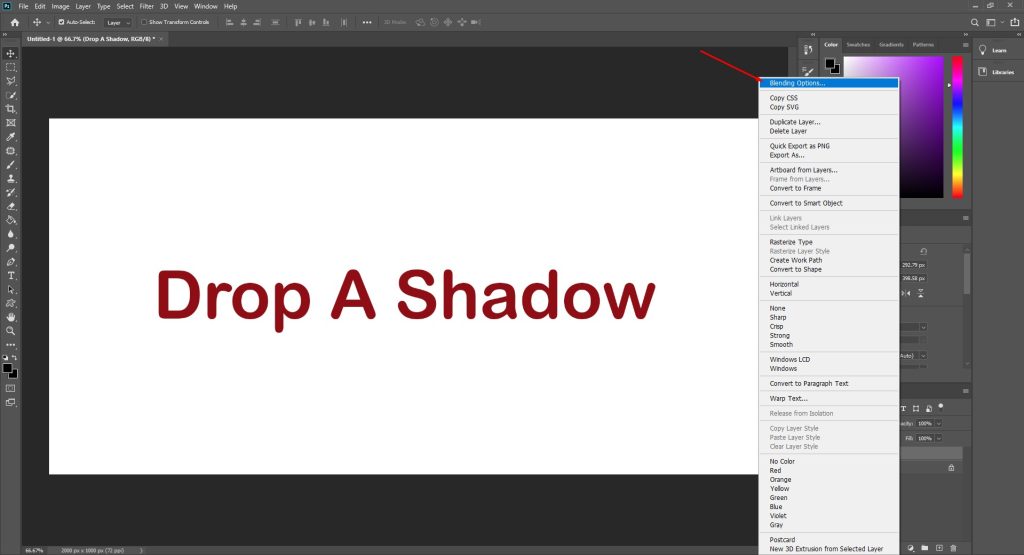
Click on Blending Options. - In the new window that opens, choose Drop Shadow.

Click on Drop Shadow.
Adjust the Shadow Options
Drop Shadow tool has a couple of options that allow you to adjust the appearance of the shadow.
- To adjust the options such as Opacity, Distance, Spread, Size, and NoiseHow to Add a Drop Shadow in Photoshop, move the white arrow sliders.

Move the white arrows to adjust the shadow’s appearance. - You can also manually adjust the sliders by typing the %/px value.

Type in the %/px value. - When you are happy with the results, click OK.

Click OK to save the drop shadow options.